
There's a network spreadsheet. You know the one. It has multiple tabs with all of your network infrastructure and circuits in it. The last time anyone updated it was sometime a few months ago but many forget to keep it up to date. Now it's an artifact more than a living document. It now tells you what your network used to look like, which is only mildly frustrating if you're OCD and trying to run playbooks against now inaccurate infrastructure data.
NetBox isn't a replacement spreadsheet. It's a proper, API-driven infrastructure database. Devices go in. IPs go in. VLANs, sites, roles, rack positions and all of it. And when you pair it with a few Python scripts, it starts filling itself in automatically while you get to focus on the important things for your business.
I want to share what it is, why it matters, how to use it, and an example of how I use for work and my home lab.
What is NetBox?
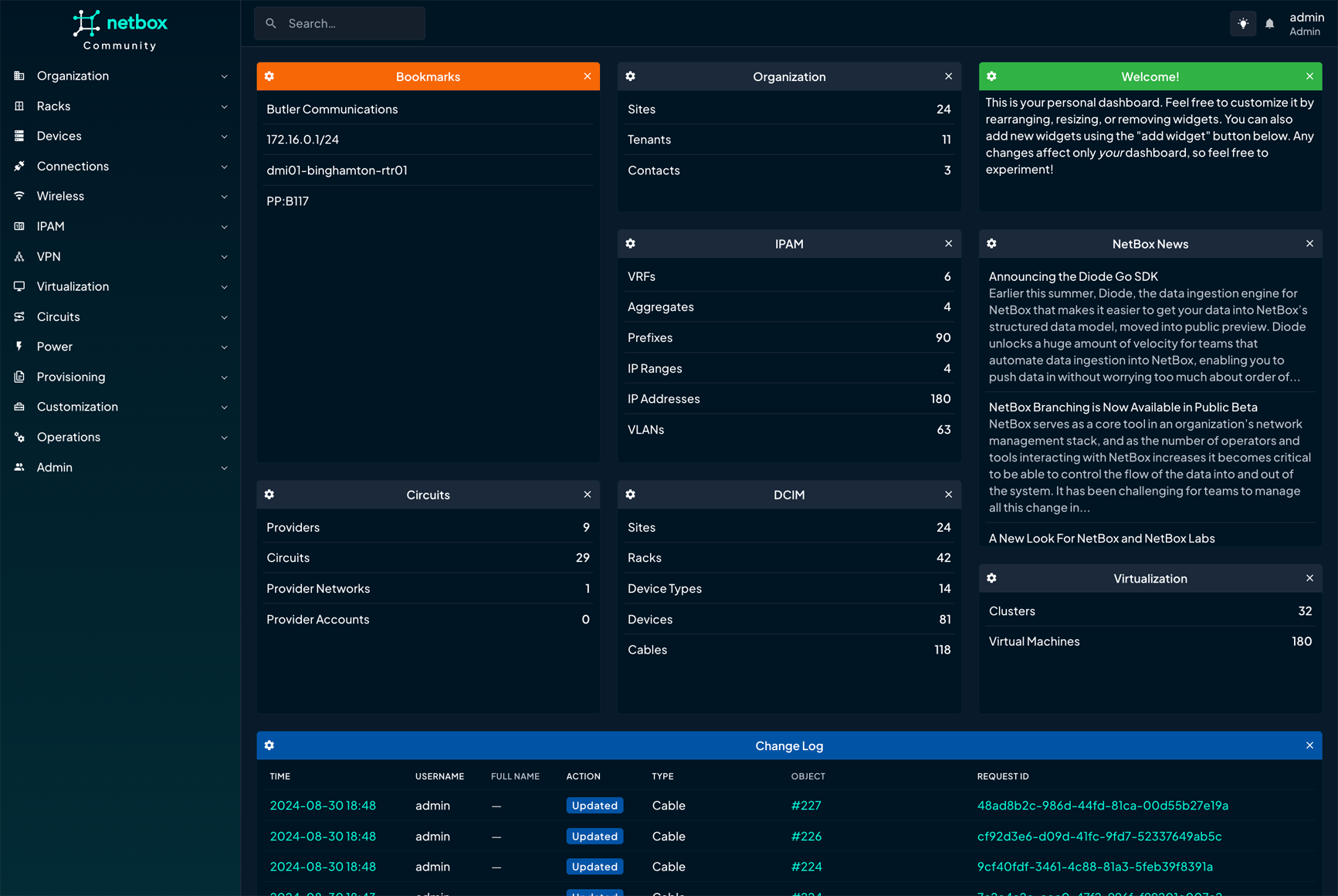
NetBox is an open-source infrastructure resource modeling (IRM) tool. It was built by the network team at DigitalOcean, is now maintained by the NetBox Labs community, and has become the go-to source of truth for network teams that are tired of lying to themselves about what their infrastructure actually looks like.
At its core, it's a structured database with a killer GUI for your network. Devices, IPs, VLANs, cables, racks, circuits, virtual machines. It models all of it, and it does it with a clean web UI and a solid REST API that makes automation genuinely enjoyable to work with. Which is a sentence I never expected to write about documentation tooling, but here we are.
NetBox isn't where you write things down after the fact and hope someone reads it. It's the thing you consult before you do anything, and the thing you update the moment something changes. Your Ansible playbooks ask NetBox what devices exist. Your monitoring stack reads from NetBox. Your DHCP logic references NetBox. Everything points back to it, which means when something is wrong in NetBox, you find out fast. Not six months later when a playbook targets a switch that's been decommissioned 6 months ago.
Core Features (The Good Stuff)
DCIM: Device and Infrastructure Modeling
Sites, racks, devices, device types, interfaces, cables, power and the whole physical (or virtual) picture. A device isn't just a hostname here. It has context: what site it's in, what role it plays, what manufacturer made it, what interfaces it has, and what's plugged into those interfaces. That context is what makes automation useful instead of just fast.
IPAM: IP Address Management
Prefixes, VLANs, IP addresses, VRFs, RIRs. You can query NetBox for the next available IP in a prefix before you deploy something. You can look up what's on a VLAN. You can link an IP directly to the interface it lives on. This is the part that makes your future self grateful.
Virtualization
Cluster types, clusters, VMs, virtual interfaces. If you're running Proxmox with a stack of LXCs and k3s nodes, this is where they live. Your hypervisors have a home. Your VMs have a home. Everything has a home and nobody is squatting on IPs unaccounted for.
Circuits
ISP circuits, providers, termination points. Useful when you're juggling multiple uplinks, or when you just want to know when a circuit contract expires before the provider calls to tell you it already did.
Custom Fields and Tags
NetBox doesn't force you into its default schema. You can add custom fields to any object such as unifi_id, camera_resolution, vlan_profile, whatever your environment needs. Tags let you group and filter in ways the built-in fields don't anticipate. It's flexible in the right places without being chaotic about it.
REST and GraphQL API
Every single object in NetBox is fully accessible via REST and GraphQL. This is the thing that separates "documentation tool" from "automation platform." The API is well-designed, versioned, and ships with a full Swagger UI at /api/schema/swagger-ui/ that documents every endpoint and what a valid payload looks like.
Change Logging and Webhooks
Every create, update, and delete is logged with timestamps and user attribution. So when something breaks and you need to know who touched it and when, you have an actual answer instead of "I think it was Tom." Webhooks let you fire events into automation pipelines whenever something in NetBox changes. Pair that with AWX or n8n and you've got event-driven infrastructure automation without a lot of extra plumbing.
Plugins
The community has built plugins for BGP topology, configuration rendering, secrets management, and a bunch of other things. It's an active and genuinely useful ecosystem.
Tip: Before writing a single line of Python, open the Swagger UI at /api/schema/swagger-ui/ and click around for ten minutes. Every endpoint is documented with example payloads. It's legitimately good API documentation, which I feel like I should acknowledge because that's rarer than it should be.Why Automation Needs a Source of Truth
Here's the problem automation runs into pretty quickly: your tools need context. Ansible needs to know what devices to target. Your monitoring stack needs a device list. Without a central source of truth, you end up in one of three situations:
- You hardcode everything into playbooks. This works great until it doesn't.
- You maintain a static inventory file that drifts out of sync. You tell yourself you'll update it, but forget.
- You wing it and hope your memory is reliable. It isn't.
NetBox fixes this by being the thing everything reads from and writes to. The workflow looks like this:
Discover            Normalize          Source of Truth    Consume
(UniFi / Scan)  →  (Python Script)  →  (NetBox API)   →  (Ansible / AWX / Monitoring)
The import scripts we're building handle that first arrow, pulling real device data from your UniFi controller, Proxmox hosts, your NAS, and your cameras, then pushing it into NetBox automatically. Once that's running on a schedule, you stop thinking about inventory files. NetBox just knows.
Prerequisites and Setup
What you'll need
You'll need a running NetBox instance. The netbox-docker project gets you up in under an hour on a Proxmox VM or LXC, and k3s works too if you're already there. You'll also need a NetBox API token with write access (Settings > API Tokens, two clicks), Python 3.8+ with pynetbox, requests, and python-dotenv installed, UniFi controller access (works with UniFi OS on a UDM/UDM-Pro or the older standalone controller), and network access from wherever the script runs to your devices.
Install dependencies
pip install pynetbox requests python-dotenv

# Make sure it worked
python3 -c "import pynetbox; print(pynetbox.__version__)"
Environment config
Credentials go in a .env file. For the love of god, not in the script.
I'm going to show examples from my lab, oberbean.com.
# NetBox
NETBOX_URL=https://netbox.oberbean.com
NETBOX_TOKEN=your_api_token_here

# UniFi Controller
UNIFI_HOST=https://unifi.oberbean.com
UNIFI_USER=your_admin_user_here
UNIFI_PASS=your_password_here
UNIFI_SITE=default

# Site / defaults
NETBOX_SITE=Home
NETBOX_TENANT=oberbean
Heads up: Add.envto your.gitignoreright now, before you do anything else. A NetBox token in a GitLab repo, even a private one, is the kind of thing you forget about until it matters.
Pre-populate device roles and types
Before the scripts run, NetBox needs to know what roles exist, things like "Wireless AP," "Security Camera," "NAS/Storage." The scripts handle this automatically by checking for existence before creating. Nothing to set up manually, but it's worth understanding what's happening under the hood.
Step-by-Step: Dynamic Device Import
Here's how the import flow works from start to finish:
- Query the source system. Hit the UniFi controller API, scan your network, or pull from your NAS. Get the raw data: MACs, IPs, names, model numbers.
- Normalize it to NetBox's schema. UniFi's
modelfield becomes a NetBoxdevice_type. The device'sipbecomes an IP address object linked to an interface. This mapping step is where most of the logic lives. - Upsert, don't blindly create. Check if the device already exists before creating it. If it's already in NetBox, update it. This is what makes the script safe to run on a schedule without duplicating half your inventory every time.
- Assign IP addresses. Create or update IP address objects, link them to the device's primary interface, and optionally set them as the primary IP so NetBox knows how to reach it.
- Log everything. Print a clear summary of what was created, updated, and skipped. Run with
--dry-runfirst so you can see what's going to happen before anything actually touches NetBox.
Script Examples
The shared helper module: netbox_helpers.py
This handles the NetBox connection and all the common operations. Every device-specific script imports from here so we're not copy-pasting the same upsert logic five times and then fixing a bug in two of them.
#!/usr/bin/env python3
# netbox_helpers.py — shared utilities for NetBox imports
# oberbean.com homelab automation

import os
import pynetbox
from dotenv import load_dotenv

load_dotenv()

nb = pynetbox.api(
    os.getenv("NETBOX_URL"),
    token=os.getenv("NETBOX_TOKEN")
)
nb.http_session.verify = False  # flip to True in prod with a valid cert

SITE_NAME   = os.getenv("NETBOX_SITE", "Home")
TENANT_NAME = os.getenv("NETBOX_TENANT", "oberbean")


def get_or_create_manufacturer(name):
    """Get or create a manufacturer by name."""
    mfr = nb.dcim.manufacturers.get(name=name)
    if not mfr:
        slug = name.lower().replace(" ", "-")
        mfr = nb.dcim.manufacturers.create(name=name, slug=slug)
        print(f"  [+] Created manufacturer: {name}")
    return mfr


def get_or_create_device_type(model, manufacturer_name, u_height=1):
    """Get or create a device type."""
    mfr = get_or_create_manufacturer(manufacturer_name)
    slug = model.lower().replace(" ", "-").replace("/", "-")
    dt = nb.dcim.device_types.get(slug=slug)
    if not dt:
        dt = nb.dcim.device_types.create(
            model=model, slug=slug,
            manufacturer=mfr.id, u_height=u_height
        )
        print(f"  [+] Created device type: {model}")
    return dt


def get_or_create_device_role(name, color="2196f3"):
    """Get or create a device role."""
    slug = name.lower().replace(" ", "-")
    role = nb.dcim.device_roles.get(slug=slug)
    if not role:
        role = nb.dcim.device_roles.create(
            name=name, slug=slug, color=color, vm_role=False
        )
        print(f"  [+] Created device role: {name}")
    return role


def upsert_device(name, device_type_id, role_id, site_name, status="active"):
    """Create or update a device. Returns (device, created_bool)."""
    site = nb.dcim.sites.get(name=site_name)
    if not site:
        raise ValueError(f"Site '{site_name}' not found in NetBox.")

    existing = nb.dcim.devices.get(name=name)
    if existing:
        existing.update({"status": status})
        return existing, False

    device = nb.dcim.devices.create(
        name=name,
        device_type=device_type_id,
        role=role_id,
        site=site.id,
        status=status
    )
    return device, True


def assign_ip_to_device(device, ip_with_prefix, interface_name="mgmt", set_primary=True):
    """Assign an IP to a device interface and optionally set it as the primary IP."""
    iface = nb.dcim.interfaces.get(device_id=device.id, name=interface_name)
    if not iface:
        iface = nb.dcim.interfaces.create(
            device=device.id,
            name=interface_name,
            type="1000base-t"
        )

    ip_obj = nb.ipam.ip_addresses.get(address=ip_with_prefix)
    if not ip_obj:
        ip_obj = nb.ipam.ip_addresses.create(
            address=ip_with_prefix,
            assigned_object_type="dcim.interface",
            assigned_object_id=iface.id,
            status="active"
        )
    else:
        ip_obj.update({
            "assigned_object_type": "dcim.interface",
            "assigned_object_id": iface.id
        })

    if set_primary:
        device.update({"primary_ip4": ip_obj.id})

    return ip_obj
UniFi APs and appliances — import_unifi.py
This authenticates to your UniFi controller, pulls all adopted devices, maps them to roles (AP, switch, router), and imports them into NetBox. Works with UniFi OS on a UDM/UDM-Pro. If you're still on the old standalone controller, swap the login endpoint — the device endpoint is the same.
#!/usr/bin/env python3
# import_unifi.py — Import UniFi devices into NetBox
# Handles: APs (U6-Lite, U6-Pro, etc.), USW switches, USG/UDM routers
# oberbean.com

import os
import requests
from dotenv import load_dotenv
from netbox_helpers import SITE_NAME, upsert_device, assign_ip_to_device
from netbox_helpers import get_or_create_device_type, get_or_create_device_role

load_dotenv()

UNIFI_HOST = os.getenv("UNIFI_HOST")
UNIFI_USER = os.getenv("UNIFI_USER")
UNIFI_PASS = os.getenv("UNIFI_PASS")
UNIFI_SITE = os.getenv("UNIFI_SITE", "default")

# Map UniFi device type prefixes to NetBox roles
# Color codes are hex values NetBox uses for the role badge
DEVICE_ROLE_MAP = {
    "ugw": ("Firewall/Router", "Ubiquiti", "f44336"),
    "udm": ("Firewall/Router", "Ubiquiti", "f44336"),
    "usw": ("Access Switch",   "Ubiquiti", "3f51b5"),
    "uap": ("Wireless AP",     "Ubiquiti", "009688"),
    "uxg": ("Firewall/Router", "Ubiquiti", "f44336"),
}


def unifi_login():
    """Authenticate to UniFi controller. Returns session."""
    session = requests.Session()
    session.verify = False

    r = session.post(
        f"{UNIFI_HOST}/api/auth/login",
        json={"username": UNIFI_USER, "password": UNIFI_PASS},
        headers={"Content-Type": "application/json"}
    )
    r.raise_for_status()
    print("[✓] Authenticated to UniFi controller")
    return session


def get_unifi_devices(session):
    """Pull all adopted devices from the site."""
    r = session.get(
        f"{UNIFI_HOST}/proxy/network/api/s/{UNIFI_SITE}/stat/device"
    )
    r.raise_for_status()
    return r.json().get("data", [])


def guess_role(device_type_str):
    """Map a UniFi device type string to a NetBox role tuple."""
    prefix = device_type_str[:3].lower()
    return DEVICE_ROLE_MAP.get(prefix, ("Network Device", "Ubiquiti", "607d8b"))


def import_unifi_devices(dry_run=False):
    session = unifi_login()
    devices = get_unifi_devices(session)
    created = updated = skipped = 0

    print(f"\n[→] Processing {len(devices)} UniFi devices...\n")

    for dev in devices:
        model    = dev.get("model", "Unknown")
        name     = dev.get("name") or dev.get("hostname") or dev.get("mac")
        ip       = dev.get("ip")
        dev_type = dev.get("type", "uap")

        if not name:
            skipped += 1
            continue

        role_name, mfr_name, color = guess_role(dev_type)
        print(f"  [{dev_type.upper()}] {name} ({model}) — {ip}")

        if dry_run:
            continue

        dt   = get_or_create_device_type(model, mfr_name)
        role = get_or_create_device_role(role_name, color)

        device, was_created = upsert_device(
            name=name,
            device_type_id=dt.id,
            role_id=role.id,
            site_name=SITE_NAME
        )

        if ip:
            assign_ip_to_device(device, f"{ip}/24")

        if was_created:
            created += 1
        else:
            updated += 1

    print(f"\n[✓] Done. Created: {created}  Updated: {updated}  Skipped: {skipped}")


if __name__ == "__main__":
    import_unifi_devices(dry_run=False)
Security cameras — import_cameras.py
Cameras are a great use case for NetBox custom fields because there's a lot of context you want to track beyond just name and IP — model, resolution, whether it's a fisheye pointed at the garage or a telephoto aimed at the driveway. This script pulls from the UniFi Protect local API and optionally writes custom fields back to the device record.
#!/usr/bin/env python3
# import_cameras.py — Import UniFi Protect cameras into NetBox
# oberbean.com

import os
from dotenv import load_dotenv
from netbox_helpers import SITE_NAME, upsert_device, assign_ip_to_device
from netbox_helpers import get_or_create_device_type, get_or_create_device_role

load_dotenv()

PROTECT_HOST = os.getenv("UNIFI_HOST")  # same UDM host


def get_protect_cameras(session):
    """Fetch cameras from the UniFi Protect local API."""
    r = session.get(
        f"{PROTECT_HOST}/proxy/protect/api/cameras",
        headers={"X-CSRF-Token": session.cookies.get("csrf_token", "")}
    )
    r.raise_for_status()
    return r.json()


def import_cameras(session, dry_run=False):
    cameras = get_protect_cameras(session)
    role    = get_or_create_device_role("Security Camera", "e91e63")
    created = updated = 0

    print(f"\n[→] Processing {len(cameras)} cameras...\n")

    for cam in cameras:
        name  = cam.get("name") or cam.get("mac")
        model = cam.get("type", "UniFi Camera")
        ip    = cam.get("host")
        state = "active" if cam.get("state") == "CONNECTED" else "offline"

        print(f"  [CAM] {name} ({model}) — {ip} [{state}]")

        if dry_run:
            continue

        dt = get_or_create_device_type(model, "Ubiquiti")
        device, was_created = upsert_device(
            name=name,
            device_type_id=dt.id,
            role_id=role.id,
            site_name=SITE_NAME,
            status=state
        )

        if ip:
            assign_ip_to_device(device, f"{ip}/24")

        # Custom fields are optional — configure them in NetBox first
        # or this block just silently does nothing, which is fine
        try:
            device.update({"custom_fields": {
                "camera_resolution": cam.get("videoMode", ""),
                "protect_id":        cam.get("id", "")
            }})
        except Exception:
            pass

        created += was_created
        updated += (not was_created)

    print(f"\n[✓] Done. Created: {created}  Updated: {updated}")
NAS devices — import_nas.py
NAS devices usually don't have a convenient REST API you want to poll continuously, so this one is config-driven. Define your NAS boxes in the script (or a YAML file if you're feeling fancy), and it'll create or update them in NetBox on each run. Easy to extend with the Synology DSM API later if you want more detail than a box with an IP address.
#!/usr/bin/env python3
# import_nas.py — Config-driven NAS import into NetBox
# Extend with Synology DSM API or load from YAML as needed
# oberbean.com

from netbox_helpers import SITE_NAME, upsert_device, assign_ip_to_device
from netbox_helpers import get_or_create_device_type, get_or_create_device_role

# Define your NAS devices here
# Or swap for yaml.safe_load(open("nas_devices.yml")) if you're that person
NAS_DEVICES = [
    {
        "name":         "nas-01",
        "model":        "DS1821+",
        "manufacturer": "Synology",
        "ip":           "10.0.20.10",
        "prefix_len":   24,
    },
    {
        "name":         "nas-backup",
        "model":        "TS-453D",
        "manufacturer": "QNAP",
        "ip":           "10.0.20.11",
        "prefix_len":   24,
    },
]


def import_nas_devices():
    role = get_or_create_device_role("NAS/Storage", "ff9800")
    created = updated = 0

    print(f"\n[→] Processing {len(NAS_DEVICES)} NAS devices...\n")

    for nas in NAS_DEVICES:
        print(f"  [NAS] {nas['name']} ({nas['model']}) — {nas['ip']}")

        dt = get_or_create_device_type(nas["model"], nas["manufacturer"], u_height=2)
        device, was_created = upsert_device(
            name=nas["name"],
            device_type_id=dt.id,
            role_id=role.id,
            site_name=SITE_NAME
        )

        assign_ip_to_device(device, f"{nas['ip']}/{nas['prefix_len']}")

        created += was_created
        updated += (not was_created)

    print(f"\n[✓] Done. Created: {created}  Updated: {updated}")


if __name__ == "__main__":
    import_nas_devices()
The glue — run_all_imports.py
One script to run them all. Use this manually, schedule it via cron, or drop it into an AWX Job Template if you want execution history and the ability to trigger it from a button in a web UI like a reasonable person.
#!/usr/bin/env python3
# run_all_imports.py — Orchestrate all device imports
# Schedule via cron or AWX for continuous sync
# oberbean.com

import argparse
from import_unifi import import_unifi_devices, unifi_login
from import_cameras import import_cameras
from import_nas import import_nas_devices


def main():
    parser = argparse.ArgumentParser(description="Import all devices into NetBox")
    parser.add_argument("--dry-run", action="store_true", help="Preview only, no writes")
    args = parser.parse_args()

    if args.dry_run:
        print("[!] DRY RUN — nothing will be written to NetBox\n")

    session = unifi_login()

    print("=== UniFi Devices ===")
    import_unifi_devices(dry_run=args.dry_run)

    print("\n=== Cameras ===")
    import_cameras(session, dry_run=args.dry_run)

    print("\n=== NAS Devices ===")
    import_nas_devices()

    print("\n[✓] All imports complete.")


if __name__ == "__main__":
    main()
Running It and Verifying Results
Do the dry run!
# See what's going to happen before anything touches NetBox
python3 run_all_imports.py --dry-run

# Once you're satisfied it's not about to do something weird
python3 run_all_imports.py
What it looks like when it works
[✓] Authenticated to UniFi controller

=== UniFi Devices ===
[→] Processing 14 UniFi devices...

  [UAP] ap-hallway-01 (U6-Lite) — 10.0.10.5
  [+] Created device type: U6-Lite
  [UAP] ap-office-01 (U6-Pro) — 10.0.10.6
  [UAP] ap-garage-01 (U6-Mesh) — 10.0.10.7
  [USW] sw-core-01 (USW-Pro-24-POE) — 10.0.0.2
  [+] Created device type: USW-Pro-24-POE
  [UDM] udm-pro-01 (UDMPRO) — 10.0.0.1

[✓] Done. Created: 9  Updated: 5  Skipped: 0

=== Cameras ===
[→] Processing 6 cameras...

  [CAM] cam-garage-01 (UVC-G4-Bullet) — 10.0.30.20 [active]
  [CAM] cam-driveway-01 (UVC-G4-Pro) — 10.0.30.21 [active]

[✓] Done. Created: 6  Updated: 0

=== NAS Devices ===
[→] Processing 2 NAS devices...

  [NAS] nas-01 (DS1821+) — 10.0.20.10
  [NAS] nas-backup (TS-453D) — 10.0.20.11

[✓] Done. Created: 2  Updated: 0

[✓] All imports complete.
Nine devices created, five updated, nothing on fire. That's the goal.
Schedule it so you stop thinking about it
# Run daily at 2am, log output somewhere you'll actually look
0 2 * * * /usr/bin/python3 /opt/netbox-scripts/run_all_imports.py >> /var/log/netbox-import.log 2>&1
Or the AWX route, which is what the oberbean homelab uses. Job Template, scheduled trigger, execution history you can actually browse when something goes sideways. The cron approach works, but AWX tells you when it went sideways instead of leaving a log file for you to find three days later.
Where to Go From Here
Once the devices are in NetBox, a whole pile of things get easier — and some things you didn't even realize were annoying stop being annoying.
- Ansible dynamic inventory. The
netbox.netbox.nb_inventoryplugin can replace your statichosts.ymlentirely. NetBox becomes the source Ansible reads from. Add a device to NetBox and it shows up in your next playbook run. Remove it and it disappears from scope. It's the kind of thing that sounds obvious in retrospect. - IPAM before you deploy. Before standing up anything new, query NetBox for the next available IP in the target prefix. No more "I think that IP was free" moments at 11pm.
- Webhooks into automation. New device imported or status changed? Fire a webhook to AWX or n8n and kick off a provisioning workflow. This is where NetBox starts acting less like a database and more like the connective tissue of your whole automation stack.
- Config context. Attach structured data to sites, roles, or individual devices — VLAN lists, NTP servers, syslog destinations. Your Ansible templates pull this context directly from NetBox instead of living in group_vars files that drift.
- Custom reports. Write Python reports that surface devices with no primary IP, IPs assigned to decommissioned gear, duplicate entries. NetBox has a built-in reports framework. It's the kind of thing that catches problems before they catch you.
The real payoff is hard to describe until you've experienced it. It's the slow elimination of the mental overhead of not knowing. Where is that device? Is that IP taken? What VLAN is that camera on? When did that switch get added? NetBox answers all of it, and once it's a habit, going back to spreadsheets feels like going back to paper maps. Make the jump and use it for everything!